
I Look at Business Websites Every Day. Here Are the 15 Problems I See Most Often (And How You Can Fix Them Yourself)

Practical advice to help your business attract more customers online - even if you're not ready for a new website.

Jump to a Section
Whether you're running a small business in Ripon, Harrogate, York or elsewhere in North Yorkshire, this checklist will help you identify common website issues that could be costing you enquiries - and show you how to fix many of them yourself.
If you've landed on this article because you're worried your website isn't pulling its weight, you're in the right place.
As the owner of Robot Dog Creative, I spend a lot of time looking at business websites. Sometimes it's because a company has asked for my advice, and sometimes it's because I'm researching local businesses that I think I might be able to help.
When I come across a website that looks outdated, difficult to use or missing some of the basics, I often think, "I could really help this business."
But here's the thing...
Not every business is ready to invest in a new website, and that's absolutely fine.
If you're just starting out, watching the pennies or simply enjoy doing things yourself, I'd much rather help you improve what you've already got than keep the knowledge to myself.
So below are fifteen of the most common issues I come across, along with straightforward ways you can improve them yourself.
Let's get started.

1. It's difficult to work out what the business actually does
Why it matters
This is probably the most common issue I come across when looking at small business websites.
Imagine you're searching for an accountant in North Yorkshire. You click on a website expecting to find someone who can help with tax returns and bookkeeping, but instead you're greeted with a large photograph, a clever slogan and a "Learn More" button. After ten seconds, you're still not entirely sure what the business actually does.
What happens next?
Most people simply leave.
This is what's known as a bounce. A visitor arrives on your website, doesn't quickly find what they're were expecting and returns to Google to try another business instead.
A high bounce rate can be a sign that visitors aren't finding your website immediately relevant or useful. While every industry is different, many business websites see bounce rates somewhere between 40% and 60%. If yours is much higher than that, it's worth asking yourself whether visitors are getting the information they need quickly enough.
People don't read websites from top to bottom. They scan. Research into how people browse websites consistently shows that visitors form an impression within just a few seconds. If they can't immediately answer the question, "Is this the business I'm looking for?", they'll often move on.
That's a potential customer lost before they've even discovered how good you are.
How to improve it
Take a fresh look at the very top of your homepage and imagine you're seeing it for the first time.
Within a few seconds, could a complete stranger answer these three questions?
What does this business do?
Who is it for?
Why should I choose them instead of someone else?
For example, if you're an independent accounting firm based in North Yorkshire, a headline like:
"Friendly Accounting Services for Small Businesses Across North Yorkshire"
immediately tells visitors what you do, who you help and roughly where you work.
Compare that to something vague like:
"Helping Your Business Reach Its Potential."
It sounds positive, but it could describe an accountant, a marketing agency, a business coach or almost anything else.
Underneath your main heading, include a short paragraph that expands on your services in plain English. Avoid industry jargon where possible and write as though you're explaining your business to someone you've just met.
Finally, don't be afraid to ask friends, family or existing customers to look at your homepage for five seconds before hiding it again. Ask them one simple question:
"What do you think my business does?"
If they hesitate or get it wrong, you've probably found your first opportunity for improvement.

2. There's no obvious way to contact you
Why it matters
Imagine someone has just found your website after searching for a service you offer. They like what they see and they're ready to get in touch.
Now imagine they can't find a phone number.
Or they have to dig through three pages before they discover a contact form.
Or worse, they click "Contact Us" and the page doesn't work.
It sounds obvious, but I regularly come across websites where contacting the business feels harder than it should.
Every extra click, every extra second spent searching and every little frustration gives people another opportunity to give up and move on to a competitor.
Let's say you run a family-owned plumbing business in Ripon. A customer has a leaking pipe and needs someone today. They're unlikely to spend five minutes hunting around your website for your phone number - they'll simply go back to Google and call the next plumber instead.
Your website should make getting in touch feel effortless.
How to improve it
Take a look at your website and ask yourself, "If I wanted to contact this business right now, how quickly could I do it?"
Ideally, visitors should be able to find your contact details within a few seconds.
A few simple improvements can make a big difference:
Include your phone number and email address somewhere visible on every page, such as the header or footer.
Have a dedicated Contact page that's easy to find from your main navigation.
Make sure your contact form is short and straightforward. Only ask for the information you genuinely need.
Include alternative ways to get in touch if they're appropriate for your business, such as WhatsApp or a contact form alongside your phone number.
If you serve a particular area, mention it. For example, "Serving Ripon, Harrogate and the surrounding North Yorkshire area."
Having your contact details, or a button that takes you to the Contact page "above the fold" (meaning right there on the screen when the website loads - no need to scroll) helps people get in touch right away. Some people may be looking to get through to you ASAP and this removes any friction.
Finally, test it.
Fill in your own contact form. Send yourself a message. Click your phone number on your mobile. It sounds simple, but you'd be surprised how many businesses don't realise their contact form has stopped working until a customer tells them.
Making it easy for people to contact you won't guarantee more enquiries, but making it difficult almost certainly guarantees fewer.
Extra tip:
Reply quickly when someone does get in touch.
Your website's job isn't finished when someone submits a contact form. If an enquiry sits unanswered for three days, that potential customer may already have found someone else. Even a quick acknowledgement to say, "Thanks for your message - I'll get back to you tomorrow," reassures people that their enquiry has been received.

3. There isn't a clear next step
Why it matters
Imagine you've found a local electrician in Harrogate. Their website looks professional, they've explained their services well and you're convinced they could do the job.
You scroll to the bottom of the page...
...and that's it.
No "Get a Quote" button.
No phone number.
No invitation to get in touch.
No suggestion of what to do next.
It might sound like a small detail, but this is where many websites lose potential customers.
People like being guided. If you've answered their questions and built enough confidence for them to take the next step, don't leave them wondering what that step is.
Every page on your website should have a purpose. Whether it's encouraging someone to contact you, request a quotation, download a guide or learn more about another service, there should always be a natural next step.
Without one, visitors often reach the end of the page, think, "That's useful," and then leave. They may fully intend to come back later... but life gets busy, distractions happen and they never do.
How to improve it
Take a look at every page on your website and ask yourself one simple question:
"What do I want someone to do after reading this page?"
If you can't answer that immediately, your visitors probably can't either.
Some simple ideas include:
Add a clear button at the end of each page, such as Request a Quote, Book a Free Consultation or Get in Touch.
If someone isn't ready to contact you yet, guide them to another useful page, such as your portfolio, testimonials or FAQs.
Keep your calls to action specific. "Contact Us" works, but something like "Request Your Free Quote Today" or "Let's Talk About Your Project" gives people a clearer reason to click.
Repeat important calls to action on longer pages so visitors don't have to scroll all the way back to the top.
Make your buttons stand out. They should be easy to spot without overwhelming the rest of the design.
Finally, remember that not everyone who visits your website is ready to buy straight away. Some people simply want to learn more about your business before making a decision. By giving them an obvious next step - whether that's reading another page, viewing your work or getting in touch - you're helping guide them naturally through their journey instead of leaving them at a dead end.
Think of your website as a conversation. A good conversation doesn't just stop halfway through - it naturally leads to the next question, the next topic or, in this case, the next click.

4. The website doesn't work well on a phone
Why it matters
There was a time when most people viewed websites on a desktop computer. Today, that's no longer the case.
For many small businesses, well over half of all website visitors arrive on a mobile phone. If your website is difficult to use on a smaller screen, there's a good chance you're losing enquiries before people have even had a chance to see what you offer.
Imagine someone is looking for a dog groomer in Ripon while they're waiting to collect the kids from school. They find your website, but the text is tiny, the menu doesn't open properly and they have to pinch and zoom just to read your services.
Most people won't persevere.
They'll simply press the back button and try another business instead.
Google also places a lot of importance on the mobile version of your website. In simple terms, if your website doesn't work well on a phone, it can make it harder to perform well in Google search results.
A mobile-friendly website isn't just a nice extra anymore - it's an essential part of giving visitors a good experience.
How to improve it
The good news is that you don't need any specialist equipment to check how your website performs on a phone.
Simply grab your mobile and spend five or ten minutes browsing your own website as though you were a potential customer.
Ask yourself:
Is the text comfortable to read without zooming in?
Are the buttons large enough to tap easily with your thumb?
Does the menu open and close properly?
Do images fit neatly on the screen?
Is there enough space between buttons and links?
Can you quickly find your contact details?
Does everything load reasonably quickly?
If possible, ask a friend or family member to do the same on a different phone. Your website might look perfect on your device but behave differently on another.
Finally, don't just test your homepage.
Visit your service pages, contact page, blog articles and enquiry forms too. It's surprisingly common for businesses to make sure the homepage looks great while other pages receive much less attention.
A website that works beautifully on mobile creates confidence. Visitors can find what they're looking for quickly, get in touch without frustration and leave with a positive impression of your business.

5. Text is too small or difficult to read
Why it matters
Have you ever opened a website on your phone and immediately had to pinch and zoom just to read a sentence?
It's frustrating, and for many people, it's enough to make them leave.
Your website's content might be excellent, but if visitors have to work hard to read it, there's a good chance they simply won't bother.
Let's say you run a family law firm in York. Someone looking for legal advice may already be feeling stressed or overwhelmed. If they're greeted by tiny text, tightly packed paragraphs and low-contrast colours, they're much more likely to click back to Google and look for a website that's easier to use.
Good website design should never make visitors think about the design itself. It should quietly help them find the information they need with as little effort as possible.
Remember, many of your visitors won't have perfect eyesight either. Making your content easier to read isn't just good design - it's about making your website more accessible to everyone.
How to improve it
Take a few minutes to read through your website on both a computer and a mobile phone.
Ask yourself:
Can I comfortably read this without zooming in?
Are my paragraphs short enough to scan easily?
Is there enough space between lines and sections?
Does the text stand out clearly against the background?
A few simple improvements can make a big difference:
Choose a clean, easy-to-read font rather than something overly decorative.
Use a sensible font size, especially on mobile devices.
Break up long blocks of text into shorter paragraphs.
Use headings and subheadings to help people scan the page.
Include bullet points where they make information easier to digest.
Make sure there's plenty of contrast between your text and the background. Light grey text on a white background might look modern, but it can be surprisingly difficult to read.
Finally, remember that people rarely read every word on a webpage. Most visitors scan first and only slow down when something catches their attention. By making your content clear, well-spaced and easy to digest, you're helping visitors find what they're looking for more quickly - and making it far more likely they'll stay on your website rather than returning to Google.

6. The website feels slow
Why it matters
We live in a world of instant information.
Whether someone's looking for a restaurant in Harrogate, a plumber in Ripon or an accountant in North Yorkshire, they expect websites to load almost immediately. If yours takes too long, many people won't wait around to see what you've got to offer.
Instead, they'll simply press the back button and try another business (AKA bounce).
It doesn't matter how beautiful your website is or how competitive your prices are - if visitors don't stick around long enough to see them, they're unlikely to become customers.
Website speed can also influence how your site performs in search engines. Google wants to recommend websites that provide a good experience, and loading speed is one of the factors it considers when deciding which results to show.
It's also worth remembering that not everyone has a lightning-fast internet connection. While your website might feel perfectly quick on your home Wi-Fi, someone browsing on a mobile network may have a very different experience.
How to improve it
The good news is that many speed issues are surprisingly easy to improve.
Some of the biggest culprits include:
Images that are far larger than they need to be.
Videos that automatically play as soon as the page loads.
Too many animations or visual effects happening at once.
Pages packed with unnecessary features that add little value to your visitors.
A good rule of thumb is to ask yourself:
"Does this actually help my customer?"
If the answer is no, it may be slowing your website down for little benefit.
You can also test your website using free tools such as Google PageSpeed Insights, which can highlight areas where improvements could be made.
Finally, remember that speed isn't just about technology - it's about first impressions.
A fast website feels modern, professional and trustworthy. A slow website can make even an excellent business feel outdated before a visitor has read a single word.
Every second you save makes it easier for potential customers to stay engaged, explore your services and ultimately get in touch.

7. Images are poor quality
Why it matters
Whether we realise it or not, we all make quick judgements based on appearance.
The quality of the images on your website can have a huge impact on how professional and trustworthy your business feels.
Imagine you're looking for a café in Ripon. One website is full of bright, crisp photographs showing the food, coffee and atmosphere. Another uses blurry, stretched images that look like they were taken on an old phone ten years ago.
Even if both cafés serve fantastic food, which one are you more likely to visit?
The same applies whether you're a builder, accountant, solicitor or florist. Your images help create a first impression long before someone reads about your services.
Poor-quality photographs can unintentionally make an otherwise excellent business look dated, while strong photography immediately builds confidence.
How to improve it
The good news is that you don't necessarily need to hire a professional photographer.
Modern smartphones are capable of taking excellent photographs, particularly in natural daylight.
Here are a few simple tips:
Take photographs in good natural light wherever possible.
Keep your camera lens clean - it sounds obvious, but it's often overlooked.
Avoid blurry images by holding your phone steady or taking a few shots to choose from.
Never stretch a small image to make it fill a larger space, as this causes it to become pixelated.
Show your real business, your team, your premises or examples of your work wherever possible.
If you do use stock photography, choose carefully. Visitors have become very good at spotting generic images of smiling people shaking hands in spotless offices that bear little resemblance to the actual business.
Authenticity almost always wins.
Finally, remember that every image on your website should have a purpose. Rather than filling space, ask yourself whether each photograph helps a visitor understand your business, builds trust or showcases the quality of your work.
If it does, keep it. If it doesn't, consider replacing it with something more meaningful.
Your photographs are often the first thing people notice. Make sure they're helping to tell the right story about your business.
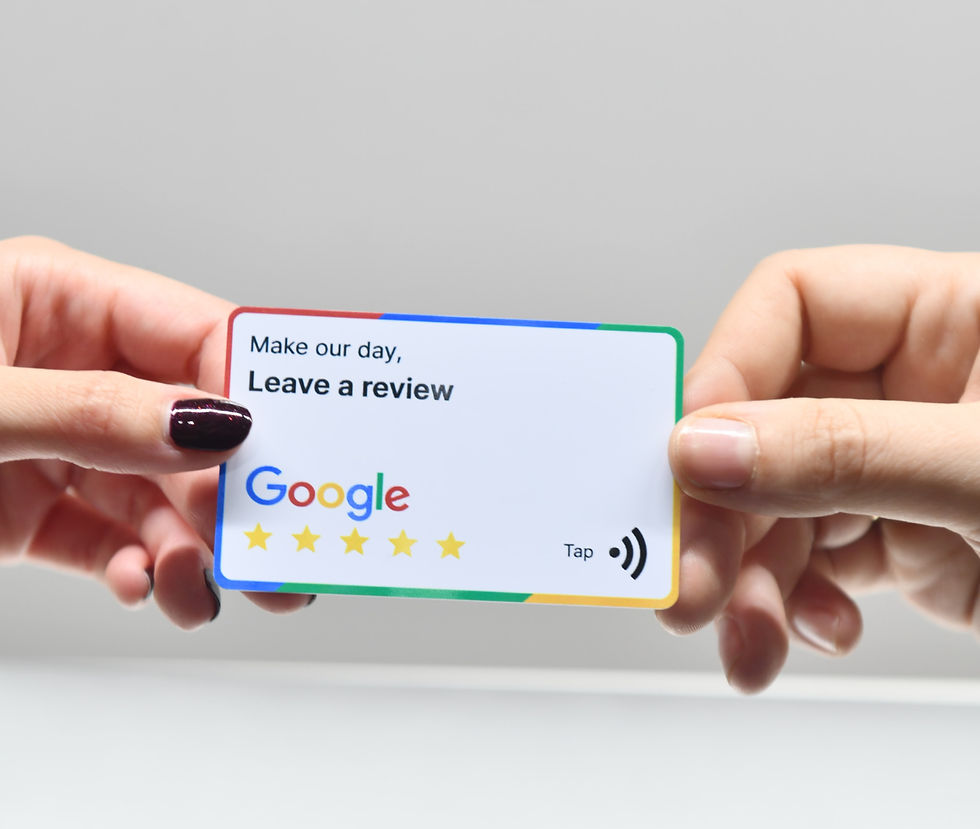
8. There are no customer reviews
Why it matters
Imagine you're looking for a local electrician in North Yorkshire.
You find two businesses.
The first has a professional-looking website with several genuine customer reviews explaining how reliable, friendly and knowledgeable they were.
The second has a similar website... but no reviews at all.
Which one are you more likely to contact?
Most of us naturally look for reassurance before spending our money. Customer reviews provide what's known as social proof - evidence that real people have used your business and had a positive experience.
In many cases, people trust the opinions of previous customers far more than they trust anything a business says about itself. After all, every company claims to offer excellent service. Reviews help prove it.
They're valuable for another reason too. Positive Google reviews can also strengthen your local online presence, making it easier for potential customers to discover your business when searching in your area.
How to improve it
The biggest mistake I see isn't that businesses have bad reviews...
It's that they never ask for them.
If a customer tells you how pleased they are with your work, that's often the perfect opportunity to politely ask if they'd be willing to leave a Google review.
Most happy customers are more than willing to help - they just need reminding.
Once you've collected a few reviews:
Display them on your website, particularly on your homepage and service pages.
Link to your Google reviews where appropriate so visitors can see they're genuine.
If a review mentions a particular service or project, consider placing it on the relevant page of your website.
Keep asking for reviews regularly rather than collecting lots at once and then stopping.
Quality is far more important than quantity. A handful of detailed, genuine reviews explaining what it was like to work with you is often much more persuasive than dozens of one-line comments simply saying, "Great service."
Finally, don't be afraid to respond to your Google reviews. A simple thank you shows potential customers that you value feedback and genuinely care about the people you work with.
Every positive review is another reason for someone to choose your business over a competitor. Don't let those kind words stay hidden in an email inbox when they could be helping your business grow.

9. Your website looks neglected
Why it matters
Your website is often the first interaction someone has with your business. If it looks like it hasn't been updated in years, visitors may begin to wonder whether the business itself is still active.
Imagine you're looking for a landscaper in Harrogate. You visit their website and notice the latest news article is from 2021, the copyright at the bottom still says 2022 and one of the team members retired several years ago.
None of these things necessarily mean the business isn't operating, but they can plant a seed of doubt.
Visitors might ask themselves:
"Are these prices still accurate?"
"Is this company still trading?"
"Will anyone actually reply if I get in touch?"
Small details like these can quietly undermine the confidence you've worked so hard to build.
Google also likes to see signs that a website is being maintained. While simply changing your copyright date won't magically improve your rankings, regularly reviewing and updating your website helps ensure the information Google finds is accurate and useful.
How to improve it
Think of your website like your business premises. You wouldn't leave old posters in the window or display prices from three years ago, so your website deserves the same attention.
Every few months, spend half an hour giving it a health check.
Things worth reviewing include:
Opening hours.
Phone numbers and email addresses.
Staff profiles and team photographs.
Prices and service information.
Your portfolio or recent projects.
Customer testimonials.
Links to your social media accounts.
The copyright year in the footer.
Any blog posts or news articles that could benefit from an update.
While you're there, click through your website as though you were a customer seeing it for the first time. You'd be surprised how often business owners spot spelling mistakes, broken links or outdated information they'd completely forgotten about.
A well-maintained website sends a simple but powerful message:
"This business is active, professional and pays attention to detail."
And that's exactly the impression you want to leave with every potential customer who visits your website.

10. The writing is full of jargon
Why it matters
When we know our industry inside out, it's easy to forget that our customers don't.
Every profession has its own terminology, abbreviations and buzzwords. While those words make perfect sense to you, they can leave potential customers feeling confused or overwhelmed.
Imagine you're looking for an accountant in North Yorkshire and their website proudly states that they provide:
"Comprehensive fiscal optimisation solutions and strategic financial compliance services."
It sounds impressive...
...but what does it actually mean?
Now compare that with:
"We help small businesses save time, stay on top of their accounts and avoid unexpected tax surprises."
Most people would immediately understand the second version.
Your website isn't trying to impress people with complicated language - it's trying to help them decide whether you're the right person for the job.
Clear writing builds trust. Confusing writing creates distance.
How to improve it
One of the simplest writing tips I can give is this:
Write as though you're explaining your business to someone over a cup of coffee.
Forget what sounds impressive and focus on what sounds clear.
Ask yourself:
Would someone outside my industry understand this?
Could I say the same thing using simpler words?
Am I writing for my customers or for other people in my profession?
Where possible:
Replace technical jargon with plain English.
Explain specialist terms if you genuinely need to use them.
Keep sentences fairly short and conversational.
Write naturally, rather than trying to sound overly corporate.
Focus on the problems you solve rather than the processes you use.
A good test is to ask a friend or family member to read one of your service pages.
If they can explain back to you what your business does and how you help people, you're probably on the right track.
If they look slightly puzzled...
...there's a good chance your customers are too.
The clearest websites are rarely the ones with the biggest words. They're the ones that make visitors feel understood, informed and confident enough to take the next step.

11. There's no About page
Why it matters
People don't just buy products or services.
They buy confidence.
If you're choosing between two accountants in Ripon, two builders in Harrogate or two web designers in North Yorkshire, and one business has a friendly, personal About page while the other is completely anonymous, which one feels more trustworthy?
For many people, the answer is obvious.
Your About page gives visitors the chance to get to know the person or people behind the business. It reassures them that there's a real human being on the other end of the phone or email.
This is especially important for small businesses. Unlike large corporations, your personality, experience and values are often part of what makes your business unique.
People like buying from people they feel they know.
How to improve it
A good About page isn't a list of qualifications or a detailed history of your company.
Instead, think of it as your opportunity to introduce yourself.
Some things you could include are:
Who you are.
How your business started.
Why you enjoy what you do.
What experience you bring.
What makes your approach different.
The areas you work in, such as Ripon, Harrogate or across North Yorkshire.
A friendly photograph of yourself or your team.
Don't be afraid to let a little personality shine through. People appreciate authenticity far more than perfectly polished corporate language.
If you're a sole trader or family-run business, that's something to celebrate, not hide. Many customers actively choose local independent businesses because they prefer the personal service they offer.
Finally, remember that your About page isn't really about you.
It's about answering the question every potential customer is asking:
"Can I trust this person to help me?"
A warm, honest About page can often do more to answer that question than any amount of sales copy ever could.

12. There are broken links or missing pages
Why it matters
Imagine you're looking for a financial adviser in York. Their website looks professional, you've read about their services and you're interested in finding out more.
You click the Testimonials page...
"404 - Page Not Found."
So you try the Contact page...
Nothing happens.
Suddenly, your confidence starts to disappear.
Broken links are a bit like finding a locked door in a shop that's supposed to be open. They interrupt the visitor's journey and make people wonder how well the website - and perhaps even the business itself - is being looked after.
Sometimes it's something as simple as a link to a social media page that no longer exists. Other times it's an old page that was deleted without updating the navigation.
Either way, every broken link creates unnecessary friction, and that's exactly what we're trying to avoid.
How to improve it
Fortunately, this is one of the easiest problems to fix.
Every few months, set aside ten or fifteen minutes to browse your website as though you were a new visitor.
Click everything.
Check that:
Every menu item opens the correct page.
Buttons take visitors where they're expect to go.
Contact forms still work.
Downloadable documents are still available.
Links to your social media profiles are up to date.
External links still point to the correct websites.
If you have a larger website, there are also free online tools that can scan your pages and highlight broken links automatically.
Finally, if you've recently changed the structure of your website or removed old pages, make sure visitors are redirected to the most relevant new page wherever possible. That way, anyone following an old bookmark or Google result still ends up somewhere useful.
Broken links are usually quick to fix, but the impression they leave can last much longer. A website that works smoothly from start to finish quietly reinforces the idea that your business is professional, reliable and pays attention to detail.

13. You're not giving Google much to work with
Why it matters
One of the biggest misconceptions about Google is that it somehow "just knows" what every website is about.
It doesn't.
Google is incredibly clever, but it still relies on the information you provide to understand your business.
Imagine you run a family-owned accounting practice in North Yorkshire, but your homepage simply says:
"Welcome to Smith & Co."
There are a few nice photos, a contact form and not much else.
How is Google supposed to know whether you're an accountant, a solicitor, an architect or a recruitment agency?
The more clearly you explain what you do, who you help and where you work, the easier it becomes for Google to understand when your website is relevant to someone's search.
For example, if somebody searches for "small business accountant in Ripon", Google is much more likely to recommend a website that clearly talks about accounting services, small businesses and the areas it serves than one that barely mentions those things at all.
Remember, Google has one goal: to show people the most useful answer to their search. Your job is to make it as easy as possible for Google to recognise that your website is exactly that.
How to improve it
You don't need to stuff your pages with keywords or repeat the same phrases over and over. In fact, that can often do more harm than good.
Instead, focus on creating pages that genuinely explain what you do.
Each page on your website should have a clear purpose.
For example, if you offer bookkeeping, payroll and tax returns, don't simply list them all on one page. Give each service enough space to explain:
What the service is.
Who it's for.
How it helps your customers.
Why someone might choose you.
Whether you work in specific locations, such as Ripon, Harrogate or across North Yorkshire.
Use clear headings that describe the content on the page, rather than vague titles like "Our Solutions" or "What We Offer."
Finally, think about the questions your customers ask you every week.
If people regularly ask:
"How much does this cost?"
"How long does it take?"
"Do you cover my area?"
"What's included?"
...those are exactly the kinds of questions your website should answer.
The better your website answers real questions in clear, natural language, the easier it becomes for both visitors and Google to understand what your business is all about.
Good SEO isn't about trying to trick search engines.
It's about communicating clearly. And as a bonus, when you make your website easier for Google to understand, you almost always make it easier for your customers to understand too.
Speaking of Google...
If you want to know more about one of the most important SEO factors: Keywords, you can also check out this article here.

14. Your website doesn't answer common questions
Why it matters
Imagine you're looking for a wedding photographer in North Yorkshire.
You like their style, the prices seem reasonable and you're almost ready to get in touch.
But there's one thing you'd really like to know...
"Do they travel outside North Yorkshire?"
You can't find the answer anywhere.
So you leave the website.
Perhaps you'll come back later.
Perhaps you'll email them.
Or perhaps you'll find another photographer whose website answers your question immediately.
Every unanswered question creates a small amount of uncertainty. Sometimes that's enough to stop someone taking the next step.
Think about the conversations you have with new customers. Chances are, you're asked many of the same questions time and time again.
Those questions belong on your website.
Not only does this make life easier for potential customers, it can also save you time by reducing repetitive emails and phone calls.
How to improve it
Start by making a list of the questions you're asked most often.
For example:
How much does it cost?
Do you cover my area?
How long does the process take?
What happens after I get in touch?
Do you offer free quotations?
What makes you different from other businesses?
If you run a gardening business in Ripon, people might ask whether you offer regular maintenance or just one-off jobs.
If you're an accountant in Harrogate, they might want to know whether you work with sole traders or limited companies.
Every industry has its own frequently asked questions, so your website should reflect yours.
One of the easiest ways to do this is by adding an FAQ section to your homepage or service pages. Better still, create a dedicated Frequently Asked Questions page if you have enough useful information to share.
Don't be afraid to answer questions honestly, even if they seem obvious to you.
Remember, your visitors don't work in your industry. What's second nature to you may be completely new to them.
As an added bonus, FAQs are also great for search engines. Many people type their questions directly into Google, so answering those questions on your website can help you appear in searches made by potential customers.
A good FAQ section doesn't just answer questions.
It removes uncertainty, builds confidence and makes it easier for people to decide that you're the right business for them.

15. It doesn't inspire confidence
Why it matters
Sometimes I look at a website and I can't immediately point to a single thing that's wrong.
The contact details are there.
The images are decent.
The text reads well.
Everything technically works...
...and yet something still feels off.
It's difficult to explain, but it's the digital equivalent of walking into a shop that's a bit untidy, poorly lit and in need of a lick of paint. Nothing is obviously broken, but it doesn't fill you with confidence.
The opposite is true as well.
Some websites simply feel trustworthy from the moment they load. The branding is consistent, the photography is professional, the writing is friendly, the navigation is intuitive and everything works exactly as you'd expect.
As a visitor, you don't consciously notice all of those details.
You just find yourself thinking:
"These people look like they know what they're doing."
That's the feeling your own website should create.
Remember, your website is often making a first impression long before you've had the chance to speak to a potential customer. If it doesn't inspire confidence, you may never get the opportunity to show how good your service really is.
How to improve it
Ask yourself one simple question:
"If I'd never heard of my business before, would this website make me feel confident enough to get in touch?"
If the honest answer is "I'm not sure", don't worry - that's exactly why you've worked through this checklist.
If you're struggling to answer objectively, ask someone who knows nothing about your business to spend five minutes browsing your website, then ask them:
Would you trust my business?
Does my website feel modern and professional?
Was anything confusing?
Was anything difficult to find?
Would you feel comfortable contacting me?
Fresh eyes often spot things we've become blind to.
Confidence isn't created by one big feature. It's built from dozens of small details working together.
Clear messaging.
Professional photography.
Easy navigation.
Helpful content.
Customer reviews.
A fast, mobile-friendly experience.
Consistent branding.
Every improvement you've made throughout this guide helps build trust.
And trust is often the difference between someone clicking the Back button... and someone clicking Get in Touch.

Final thoughts
If you've worked through this list, congratulations - you've already taken steps that many businesses never do.
Hopefully you've spotted a few easy wins that you can tackle yourself, and your website will be stronger for it.
If, on the other hand, you've reached the end and realised your website needs attention in lots of different areas, don't be discouraged. Every successful website starts somewhere.
Sometimes spending hours trying to patch together an ageing website isn't the best use of your time. A professionally designed website that's built properly from the ground up can save countless hours, create a stronger first impression and start working as a genuine marketing tool for your business.
If you'd like an honest, no-pressure chat about your website, I'd be delighted to help. Whether you need a few pointers or a completely fresh start, Robot Dog Creative specialises in creating fast, modern websites that are designed to be found on Google, build trust and generate enquiries.
In the meantime, I hope this guide has helped you improve your website - even if we never work together. Helping small businesses succeed is what it's all about.
Want to have a no-pressure chat about your website? Click here.


Comments